Kiosk and display screens



Live demo
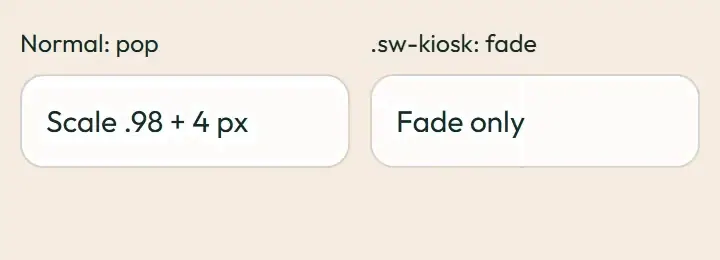
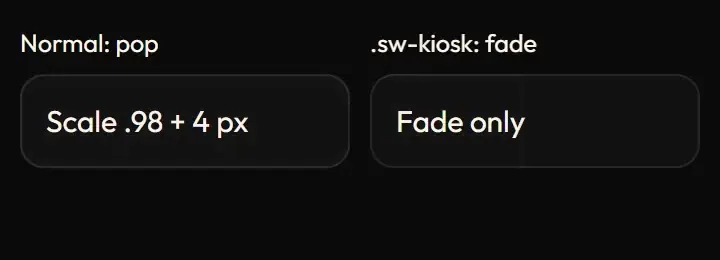
Section titled “Live demo”The page below is the real demo.html from the kit. Use its “Toggle dark” button for the dark theme.
Current rule (v2.0.1, 2026-11-13): The comparison now uses native dialog semantics and one pending request, including Escape, focus restore and scroll lock. Kiosk/TV distances are zero, so only opacity changes; initial slide fade is the documented passive-display arrival exception. Slide replacement is user-triggered, never a repainting idle loop. Supersedes the retained implementation/timing claims below; see docs/current-rules.md#cr-motion-01 and motion-flow.
The rules for screens that stay on all day: the space display (a rotating slide show on a Raspberry Pi), the kiosk and the stats TV. Slides change with one opacity fade; the distance tokens are zeroed so every shared animation (route, dialog, drawer, menu, toast) becomes a fade. Nothing loops and nothing keeps repainting while idle.
Open demo.html in a browser (it links ../../tokens/tokens.css) and use “Toggle dark” to check both themes.
| File | What it is |
|---|---|
kiosk-display.css |
sw-display-fade (400 ms slide fade) and the .sw-kiosk, .sw-tv token override, verbatim. |
demo.html |
A standalone page with the live animation in light and dark, replayable. |
react/ |
Copies of the real app files (see react/README.md for the imports to replace). |
previews/ |
Animated WebP and GIF previews, light and dark (regenerated by scripts/make-previews.mjs). |
Where the app uses it
Section titled “Where the app uses it”- Display slide fade:
features/spaceDisplay/display.css(.sw-display-fadeon each slide in the space display). - Kiosk and TV:
.sw-kiosk(components/layouts/KioskLayout.tsx) and.sw-tv(features/stats/PublicStatsTvPage.tsx) zero--sw-enter-y,--sw-pop-scale,--sw-pop-offset,--sw-slide-xinstyles/motionTokens.css.
A small Raspberry Pi browser, a wall TV or a shared kiosk must stay idle between changes and must never move content a bystander is reading. A fade shows a change without motion across the screen; zeroing the tokens gives every component that behaviour without per-component code.
Timing, easing and distance
Section titled “Timing, easing and distance”Current rule (v2.0.1, 2026-11-13): The retained table/snippet below records the original app copy. Use the current executable files and the complete flow recipe for decision 399; see current rules.
| Part | Value |
|---|---|
| Slide fade | 400 ms ease-out, opacity 0 to 1, both` |
Tokens inside .sw-kiosk / .sw-tv |
--sw-enter-y: 0px, --sw-pop-scale: 1, --sw-pop-offset: 0px, --sw-slide-x: 0% |
Trigger
Section titled “Trigger”A slide mounts or changes (key the element so the animation replays). The token override applies to everything inside the kiosk or TV wrapper.
Reduced motion
Section titled “Reduced motion”The display fade is animation: none; tokens go to 0 as everywhere else.
Dark theme
Section titled “Dark theme”Colour-neutral; the displays use the same tokens and the black-family dark theme.
Do and don’t
Section titled “Do and don’t”- Do use fades only on shared screens.
- Do key each slide so the fade replays once per change.
- Do not slide, scale or loop on kiosk, TV or display screens.
- Do not keep anything animating while idle (no CSS loops, no timers that repaint).
Copy-paste usage
Section titled “Copy-paste usage”Current rule (v2.0.1, 2026-11-13): The retained table/snippet below records the original app copy. Use the current executable files and the complete flow recipe for decision 399; see current rules.
<link rel="stylesheet" href="../../tokens/tokens.css"><link rel="stylesheet" href="../overlays/overlays.css"><link rel="stylesheet" href="kiosk-display.css"><div class="sw-kiosk"> <!-- every shared animation inside is a fade --> <section class="sw-display-fade" key="slide-3">…</section></div>Every other animation in the product, and the rules behind them: ../../docs/motion.md. Index of the kit: ../README.md.
Flow contract (decision 399)
Section titled “Flow contract (decision 399)”The comparison now uses native dialog semantics and one pending request, including Escape, focus restore and scroll lock. Kiosk/TV distances are zero, so only opacity changes; initial slide fade is the documented passive-display arrival exception. Slide replacement is user-triggered, never a repainting idle loop.
Complete rules, sequencing, keyboard and verification. The demo includes real static posters and explicit image Play/Pause controls.
Local token steps for batch 1B
Section titled “Local token steps for batch 1B”These aliases are local additions; global tokens are unchanged. Promote through the token batch when adopted.
| Local custom property | Definition |
|---|---|
--sw-local-duration-400 |
calc(var(--sw-dur-slow) * 1.66666667) |
Source
Section titled “Source”Copied from motion/kiosk-display/ on every build: the stylesheet, demo.html, react/ copies of the app files and the previews/.